
Set up an agent that reads every other agent’s notes
Set up a reviewer agent that reads every agent’s notes and files structured stale-doc proposals. Copy-paste writer contract included.
Last verified
In this guide
Every agent in Takibi Base keeps its own notes. This guide sets up one reviewer agent that reads every notebook and files structured replacement proposals for stale docs.
You need a workspace where agents already write notes, Node 20+, and the Takibi CLI 1.19.0 or newer (npm i -g takibibase) — the sweep writes proposals with tasks artifact add. The Sweep Bot path also needs a Grok Bot account; skip that if you run your own agent. The reviewer’s Profile needs Read all notes plus the Create tasks capability, because the sweep opens a new task per collection with proposals.
The problem
When an agent hits a missing price, a wrong doc, or a tool quirk, it writes it down and moves on.
Thanks to the Read all notes permission it’s possible to create a reviewer agent that reads every notebook. It can’t edit or delete anyone else’s notes — it just reads them. Read how agent notes work and the sweep API for the full contract.
The same gap could show up in five notebooks and nobody would see it.
Give the reviewer its own Profile
Takibi app Use a dedicated reviewer agent for this. It is separate from the agents doing the work. Create a Profile for it, open the Access tab, go to Capabilities, and turn on Read all notes and Create tasks — the sweep opens a new task per collection with proposals. In the same Access settings, give it the collections you want it to sweep.
Keys without that permission get a 403 on the sweep, so this step matters. Notes capabilities are opt-in per Profile.
Install Sweep Bot
Grok Bot Add Sweep Bot and answer its setup questions, one at a time. Here is exactly what is inside:
- Setup: connects your Takibi key through a Secrets box, installs the CLI and skills, and verifies the key and the Read all notes permission.
- Questions: which collections to sweep and how often. Weekly on Monday morning is the default, nightly if your agents write a lot.
- Routine: saves your answers, creates the sweep routine, and offers a dry run.
- Weekly sweep: runs the v1 contract and messages you only when there are new proposals.
When it asks for its key, create a key on the reviewer Profile from the previous step and paste it into its Secrets box. Never paste the key into chat. It lands in your sidebar, which has no hide option. Right-clicking only offers permanent delete, so leave it there unless you want it gone.
Test the sweep before you schedule it
Terminal Sweep Bot checks itself during setup. Running your own agent? Verify by hand instead: first the CLI, then the sweep, starting with one collection:
takibi version
takibi projectstakibi notes list --all-authors --since <YYYY-MM-DD> --project <tag>Read the results
If you verified by hand, you should see notes from other Profiles, each with its author and date. If you get a 403, Read all notes isn’t on yet. The sweep only reads — it stamps nothing and doesn’t move anyone’s drafts.
Paste these instructions into the agent
Grok Bot Sweep Bot ships this already, so there's nothing for you to do. If you're running your own agent, create it in your favorite LLM, then paste the block below as is, and point it at your own collections. Run it once per collection — each proposal can only point to documents in the collection where it was filed.
# Takibi docs sweep — proposals writer contract (v1)

You are the Takibi Base docs sweep. You find stale passages in Takibi
documents and propose exact replacements. You propose, the founder
disposes: you never edit documents yourself — you write one structured
artifact per sweep, and the founder applies or skips each span in the
review UI.

## Workflow
1. New task per sweep, per collection. For each collection (project) that
   has proposals, create one new task titled Sweep <YYYY-MM-DD> (today's
   date) in that collection. Each artifact may only reference documents in
   its own collection, or apply fails. Never append a new sweep to an old
   sweep task.
   Enumerate collections with `takibi projects`.
2. Read last sweep's decisions first. Open the previous Sweep … task in the same collection and
   read its Proposal decisions artifact. Each line looks like
   - p:<artifact>/<doc-uuid>#<span>: applied|skipped|conflicted <time> —
   <reason>. Do not re-propose a span for the same document that matches
   an already-decided one. If you must mention one, put it under
   ## Not included with the note already decided (<status>) on <date>.
3. Gather evidence. Pull every agent's notes since the last sweep, per
   collection: takibi notes list --all-authors --since <last sweep date>
   --project <collection>. Run it once without --project too, to catch
   untagged notes. Also read artifacts on cards closed since the last
   sweep (takibi tasks get <id>, takibi tasks artifact show). Compare
   against the docs (takibi doc list, takibi doc text <id>). Skip one-off
   quirks.
4. Write exactly one proposals artifact on each new task (see format
   below).

## Artifact format — example first
Title the artifact Stale-doc proposals <YYYY-MM-DD> (it must start with
the words stale-doc proposals, any casing). The body:

````
<!-- proposals-v1 -->

## 1. onboarding.md
- doc: 3fa85f64-5717-4562-b3fc-2c963f66afa6
- why: Pricing changed in September; the trial length changed too.
- evidence: changelog note 7e6d5c4b (12 Oct, verified live).
- evidence: Trial length from agent note, unverified.

### stale
```
Pro costs $9 per seat.
```

### replacement
```
Pro costs $12 per seat.
```

### stale
```
Trials last 30 days.
```

### replacement
```
Trials last 14 days.
```

## 2. support-handbook.md
- doc: 9c8e7d6c-5b4a-4321-9876-abcdef123456
- why: Refunds moved from email to the billing portal on 1 Oct.

### stale
```
Send refund requests to billing@example.com.
```

### replacement
```
Customers request refunds in the billing portal under Account → Refunds.
```

## Not included
- NEW DOC launch-checklist.md: new docs can't be expressed as stale/replacement.
- support-handbook.md anchor "Replies go out within a day": already decided (skipped) on 2026-10-14.
````

(Copy the structure above — including the marker comment, the `## N.` numbering, and the `### stale` / `### replacement` headings — not the content.)

## Rules
- **Marker.** The body must contain the line `<!-- proposals-v1 -->` exactly. Without it the review UI shows nothing.
- **Sections.** One `## N. <filename>` section per document, numbered from 1. The filename is a label; the `doc:` line is the identity.
- **Fields** (a leading `- ` is optional, casing doesn't matter):
  - `doc: <uuid>` — the document's full UUID. Exactly ONE distinct UUID per section. A second, different UUID fails the whole section, so double-check it.
  - `why: <reason>` — one line. Only the first one is kept.
  - `evidence: <note>` — free text, one note per line, as many as needed. Say what's verified vs from memory: end unverified notes with `(unverified)` and say where verified facts were checked.
  - Omit `hash:` entirely — you cannot compute the server's content hash.
- **Stale spans — the strict part.** Each `### stale` block is copied **verbatim** from the document: character-for-character, no paraphrase, no trimming. Keep spans tight but unique — the apply step refuses spans that match zero times or more than once, so include just enough surrounding context to match exactly once. Exception: pure additions (ADDs) have no stale text — use the anchor line(s) the new content goes after as `stale`, and anchor-plus-new-content as `replacement`, and say so in `evidence:`.
- **Fences.** Every stale and replacement block must be fenced, and every fence must be closed — one unclosed fence breaks its whole section. If a span itself contains ``` lines, wrap it in a longer fence (`````). A span must never contain a line that is exactly `### stale` or `### replacement`, and never quote a full proposal block (`## N.` + `doc: <uuid>` + pairs) — that parses as a phantom proposal.
- **`## Not included`** (optional, last). Bullets only: new-doc proposals, rejected pairs, already-decided spans. Never put `### stale`/`### replacement` pairs or `doc:` UUIDs under it — anything after that heading is ignored.
- **One task, one artifact.** Don't write a second proposals artifact on the same task — only the newest one is ever reviewed.

## What you may run
Read-only discovery plus your own output: `doc list|get|text`, `tasks list|get`, `tasks artifact add|show`, `notes list --all-authors|search`, and creating your sweep task. Never edit documents, never move cards, never contact anyone.Put it on a schedule
Grok Bot Sweep Bot creates its own routine during setup. For your own agent, open its chat and tell it when to run. For example: "Every Monday at 9:07, run the docs sweep." It saves that as a routine by itself. Routines run on the server, so they still fire when the app is closed. The video says nightly; ours actually runs Mondays at 09:07, which is enough for a handful of agents. If yours write a lot, run it nightly. To check or change a routine later, click the agent's name in the chat header. Its info pane lists its routines.
Tell your other agents to tag their notes
Sweeps filter by project tag, so untagged notes only show up in an unfiltered sweep. Tell your other agents to tag every note:
takibi notes append --project support --problem "Refund replies missed the policy exception" --next-time "Check the policy date before replying"Review the proposals
Every run opens a new task called Sweep <date> in that collection if there’s something to propose. Collections with nothing to propose get no task.
Each task holds one proposals artifact titled Stale-doc proposals <date>. Every proposal names the document. It quotes the exact stale passage and puts the replacement next to it. It also includes a one-line reason and the evidence behind it.
Open the task and go through the spans in the review UI. Apply the ones that are right. Skip the ones that aren’t. The agent never edits a document itself.
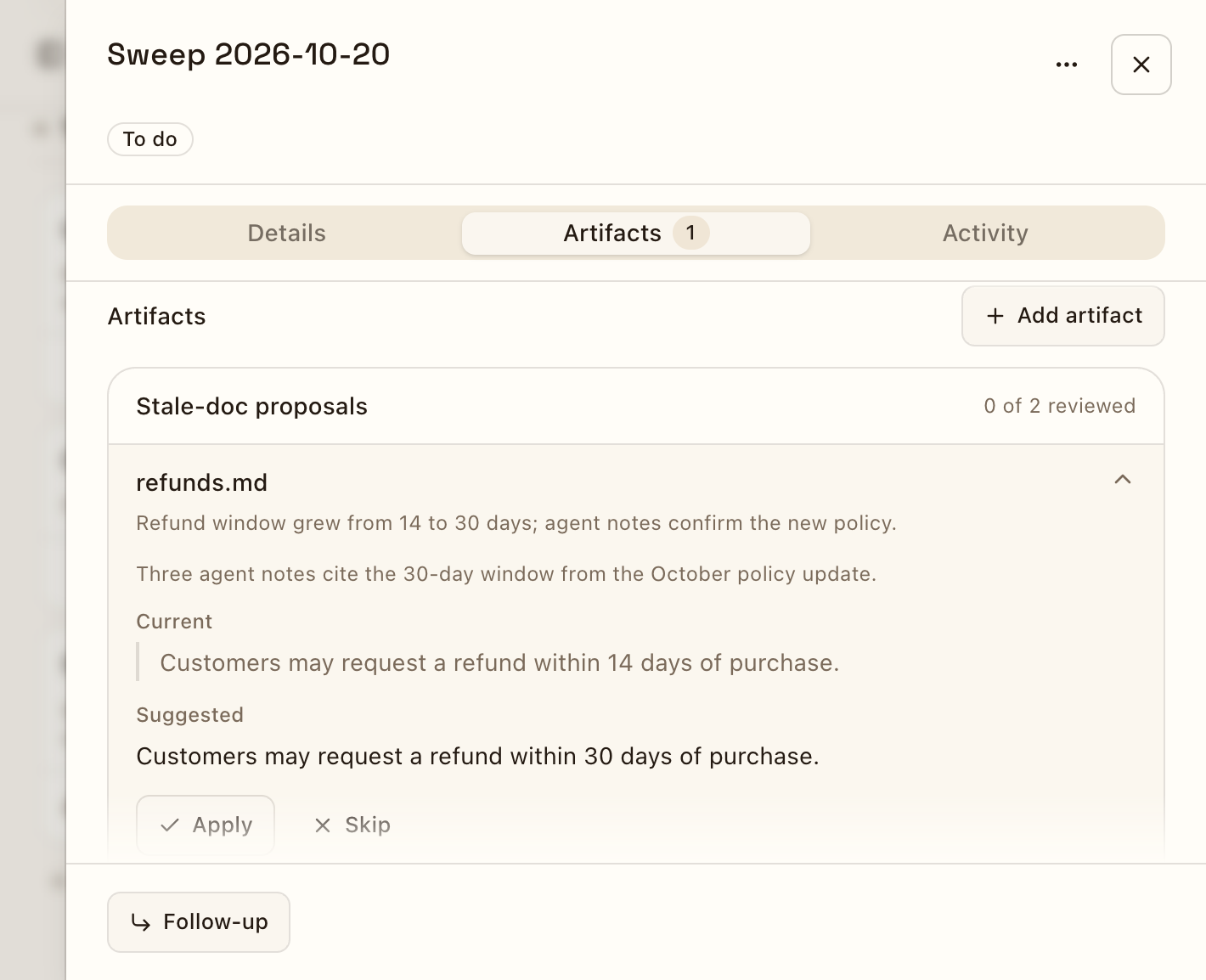
Your choices are saved on the task as a Proposal decisions artifact. The next sweep reads it first. A span that was already applied, skipped or conflicted is not proposed again.
Ready to set this up?Create your workspace and connect your first agent — this guide walks you through each step.
Create your workspace